

DIGITAL SECURITY
TERMINOLOGY

Create by Ekaterina Kilaberia


"Digital and Cyber security is a shared responsibility, and it boils down to this: in digital and cybersecurity, the more systems we security, the more secure we all are." -Jeh Johnson



TABLE OF CONTENTS
Introduction.......................................
page 6-7..... Troll................................ page 40-41...Hacking...................................
page 8-9.....Digital Security.............. page 42-43...Optical Fingerprint Scaners..
page 10-11...Grooming...................... page 44-45...Cyber Blckmail......................
page 12-13...Fake............................... page 46-47...VPN.........................................
page 14-15...Phishing........................ page 48-49...Internetrobot.......................
page 16-17...Fake News....................
page 18-19...Computer Virus............
page 20-21...Password.......................
page 22-23...Privasy...........................
page 24-25...Cyberbillyng..................
page 26-27...Dark Web.......................
page 28-29...Ransomware.................
page 30-31...Doxing...........................
page 32-33...Blackhat Haker.............
page 34-35...Dockers and doxing.....
page 36-37...Phishing Attak..............
page 38-39...Bot..................................
Irma Ganiashvili - LEPL Dusheti Municipality Public School
Of Borough Zhinvali
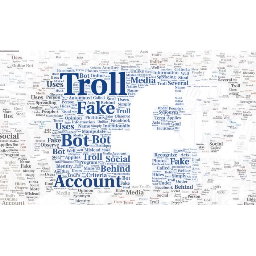
Fake accounts on Facebook - troll
There is fake information on social media quite often. Spreading fake account as "Trolls". It is account that uses fake identity, acts under a fictitious name, and may steal other people's photos. A troll's goal is to intentionally mislead social media users and manipulate opinion online. Another term "bot" is often used as a synonym for "troll". A bot is also a fake account, but unlike a troll, bots are automated. More simply, a person is behind a troll, and a program is behind a bot. To recognize a troll, we must observe several criteria:
➜ Let's look at the troll's comments: what topic is he writing about? Is it deliberately diverting attention to another matter? Is it aggressive or provocative? What agenda is he promoting?
➜ Let's look at the troll's "timeline" or news field: does he post on his own wall? If he posts of any particular media/political party/organization and only shares the links? Is this section empty? In such a case, the probability that the profile is a troll increases.
➜ Let's look at the photos: Do the photos fit? If there is not even one identifying photo, it is more likely that the profile is suspicious. If there are photos of a real person, but you still suspect that you are dealing with a troll, check the photos.
➜ Look at the address in the link: It is common when the name in the Facebook address of a suspicious account does not match the name on its profile. This is another sign that the account is suspicious.

What is Digital Security?
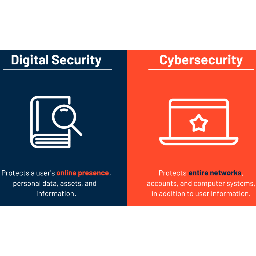
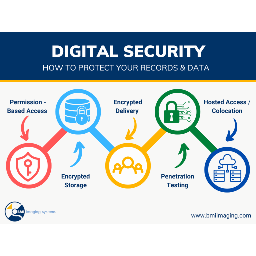
Digital security is the collective term that describes the resources employed to protect your online identity, data, and other assets. These tools include web services, antivirus software, smartphone SIM cards, biometrics, and secured personal devices. In other words, digital security is the process used to protect your online identity.
What Kind of Information is Considered a Digital Security Risk?
This data includes your name, phone number, address, email account name, IP address, and, most damaging, your Social Security number. It also includes information that potentially pinpoints your location.
If it has to do with financial transactions, it’s considered personal payment data. This information includes credit and debit card numbers, online banking numbers, and PIN codes.
Also known as personal health information (PHI), this data type encompasses information on your health, including medical history, prescription drugs, health insurance subscriptions, and doctor and hospital visits.
Ekaterina Kilaberia - LEPL Tbilisi N152 Public School
Digital Security
Please watch this video for more information
https://youtu.be/WbgbWtT5Hoo
Zeinab kakalashvili - LEPL Telavi N5 Public School
One tool common to those who sexually abuse kids is grooming: manipulative behaviors that the abuser uses to gain access to a potential victim, coerce them to agree to the abuse, and reduce the risk of being caught. While these tactics are used most often against younger kids, teens and vulnerable adults are also at risk.
Grooming can take place online or in-person. It’s usually employed by a family member or someone else in the victim’s circle of trust, such as a coach, teacher, youth group leader or others who naturally have some interaction with the victim.
Grooming

Please watch this video for more information
https://youtu.be/IUjwHPah72o
Gvenetadze Irma - Kutaisi #31 Public School
What is "fake" information?
This is information that does not correspond to the truth and that is often spread in the media, social network, and TV programs.
Misinformation is false or misleading information shared with the intent to mislead or deceive people. This is often not done on purpose because the individual or group believes that the information they are sharing is true.
Misinformation is false or misleading information shared to intentionally deceive others. It is a way to encourage others to agree with the creator's views on a certain topic.
Misinformation can be spread to make money.

How to protect yourself from misinformation?
1. All news should have a reliable source: a specific person or organization
2. We should pay attention to the web addresses, because many fake websites are created to spread misinformation
3. We should carefully check the photos that accompany the information, whether they are real or have already been published or edited with a special program
4. Check the date
5. Main! Keep thinking critically! It will help you distinguish between real and fake news and protect yourself from fraud


Ana Tepnadze - LEPL Khashuri
municipality named after D.Kakiashvili #2 public school
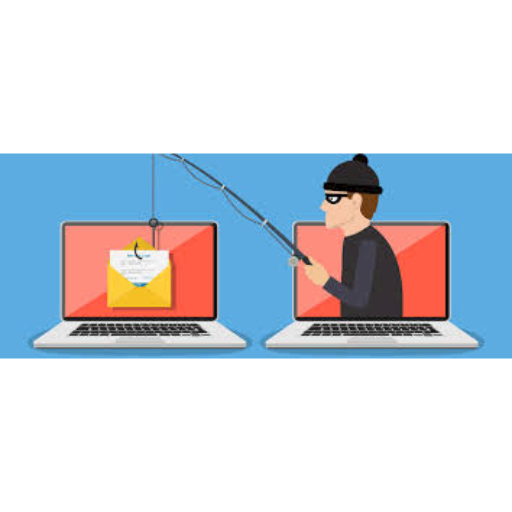
Phishing is a type of cybersecurity attack during which malicious actors send messages pretending to be a trusted person or entity. Phishing messages manipulate a user, causing them to perform actions like installing a malicious file, clicking a malicious link, or divulging sensitive information such as access credentials. Phishing is the most common type of social engineering, which is a general term describing attempts to manipulate or trick computer users. Social engineering is an increasingly common threat vector used in almost all security incidents. Social engineering attacks, like phishing, are often combined with other threats, such as malware, code injection, and network attacks.
Phishing

Manana Bakradze - LEPL Mikheil
Javakhishvili N 124 Public School
Fake news or information disorder is false or misleading information (misinformation, including disinformation, propaganda, and hoaxes) presented as news. Fake news often has the aim of damaging the reputation of a person or entity, or making money through advertising revenue.
Lots of things you read online especially in your social media feeds may appear to be true, often is not. False information is news, stories or hoaxes created to deliberately misinform or deceive readers. Usually, these stories are created to either influence people’s views, push a political agenda or cause confusion and can often be a profitable business for online publishers. False information can deceive people by looking like trusted websites or using similar names and web addresses to reputable news organisations.

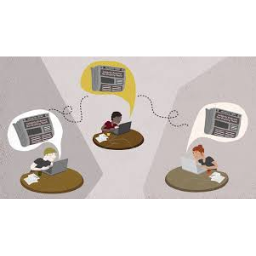



False information is not new, however it has become a hot topic since 2017.
Many people now get news from social media sites and networks and often it can be difficult to tell whether stories are credible or not.
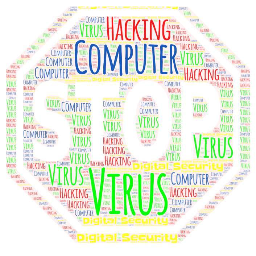
Computer virus
Malware which changes, corrupts, or destroys information, and is then passed on to other systems, usually by otherwise benign means ( e. g. sending an email). In some cases, a virus can actually cause physical damage.
Sabina Stasiak - Szkoła Podstawowa
nr 48 im. AK w Częstochowie



How to protect your computer against viruses?
Installing antivirus software. ...
Regular updates of the system and installed applications. ...
Good habits. ...
Regular data archiving. ...
Safe browser. ...
Removing viruses from infected devices...
Recovering data deleted or damaged by viruses.

Arwa Olaimat - Alznya Secondary School For Girls
password

We always advise:
Do not use common passwords that can be easily guessed, such as the name of the husband or wife, car license plate number, etc.
Hiding the password.
Ensure that the protection program hinders hackers’ attempts to intercept or steal the password.
Do not use a password for many accounts; If cybercriminals reveal the password for one, they can access all other accounts.
Do not use realistic words that are easy for hackers or cybercriminals to find
Arwa olimat
Ruqaya khawaldh -
Alznya Secondary School For Girls


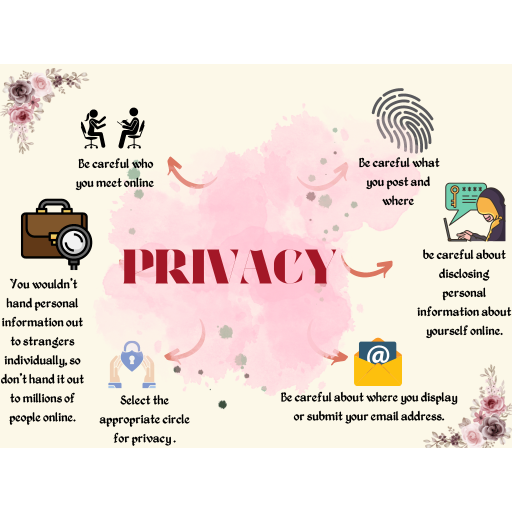
privacy



Rusudan Gorgadze - LEPL Tbilisi Vakhtang Gzirishvili Public School N173
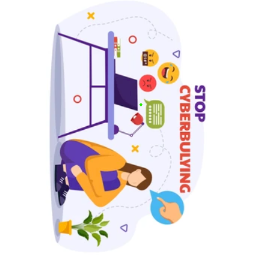
Cyberbullying -
Harassment with abusive messages, aggression, intimidation and hooliganism through various Internet services.


https://youtu.be/niaDJdEXk9U?si=urz_EWaQtTZmTJzt
https://youtu.be/0Xo8N9qlJtksi=kBoYmbpbov0U7mqr
https://youtu.be/916K8xRxQZw?si=0__WhjpS7y-rdyFG


See video resources

Njoud alananbeh - King Abdullah
the II for Excellence
The dark web is the undercover collective of internet sites that are only unrestricted by a specialized web browser called TOR. It is operated to maintain internet activity anonymous and private, which can be useful in both legal and illegal activities.
for more information visit
:https://www.investopedia.com/terms/d/dark-web.asp
Let's say you want to go on the dark web to see what information of yours, if any, is floating around. You can install the TOR browser on your system by using a virtual private network. A VPN allows people to use a public network as if they were transmitting information on a private one. It basically gives you privacy on a public network.
As you surf, you'll probably notice that dark website addresses end with the .onion extension rather than the traditional .com, .org, .edu, etc. One word of warning, though. Make sure you have some security software installed because there's a good chance that you may come in contact with malware and phishing scams.
Tsiala Bujiashvili - LEPL Gori N10 Public School




Ransomware encrypts files on a victim's device and demands payment (usually in cryptocurrency) for decryption. Ransomware attacks may be delivered through phishing emails, exploit kits, or malicious websites.


Nona Papunashvili - LEPL Akhmeta
Municipality Magraani Public School
publishing personal data or identifying information about a specific individual on the Internet, usually with negative intent
Bengi Efsa KARKIN - Turgut Özal Secondary School,Türkiye
What Does Black Hat Mean?
The use of the term black hat dates back to the 1950s. It is a term inspired by the bad guys in western movies wearing black hats. In the digital age, it is the name given to people who maliciously infiltrate computer networks for their own benefit. Black hat hackers (black hat hackers) continue their work illegally and are not officially affiliated with any institution. Their purpose may be to infiltrate the devices of individuals or institutions, to steal information, or to damage software and render it unusable. Most of the time, it continues with cyber blackmail. They demand money to restore the system and not make the information public.
Bengi Efsa KARKIN/TURGUT ÖZAL SECONDARY SCHOOL,TÜRKİYE
Black Hat Techniques and Ways of Protection
• Suspicious links are one of the most used methods in black hat attacks. When you click on the links that will appear while listening to music, downloading programs or entering untrusted sites, you may cause all your information to be captured. For this reason, you should never click on links you do not know.
• Viruses infecting the USB may cause your device to meet viruses and make you vulnerable to attacks. For this reason, it is useful not to use USB drivers that do not belong to you.
• Passwords such as “12345”, “password”, “password” are frequently used almost everywhere in the world. It is important that you do not use the same passwords on your devices and accounts and that you use different characters as much as possible.
Bengi Efsa KARKIN/TURGUT ÖZAL SECONDARY SCHOOL,TÜRKİYE
Pikria Jangavadze - LEPL Tskaltubo Municipality
Village Opshkviti Public School
In recent years, Doxing has become one of the most popular forms of cyberullying.
Doxing is a term that refers to collecting and publishing a person's personal information without their consent.
Dockers use various techniques to obtain this information, such as social engineering, social media searches, or hacking tools.
Sometimes they use fake profiles to get information directly from you. Doxers can search social networks such as Facebook, Twitter, or LinkedIn to find a victim's personal information, such as their full name, workplace, address, or phone number.
What is Doxing?
* We must not post sensitive information on social networks, forums or other public websites!
* Make sure our online accounts are protected with strong passwords!
* If w1e discover that our personal data has been published online, we must take immediate action!
* If we become a victim of Doxing, we can report it to local authorities or to the online platforms where our information was
How to avoid
d o x i n g ?


Ahlam Alqazaq - Somiah Basic mixed school
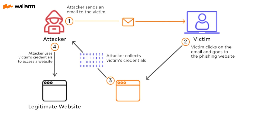
“Phishing” refers to an attempt to steal sensitive information, typically in the form of usernames, passwords, credit card numbers, bank account information or other important data in order to utilize or sell the stolen information. By masquerading as a reputable source with an enticing request, an attacker lures in the victim in order to trick them, similarly to how a fisherman uses bait to catch a fish.
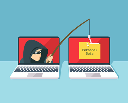
Phishing attack

1-Never provide your personal information in response to
an unsolicited request, whether it is over the phone or over
the Internet.
2-If you believe the contact may be legitimate, contact the financial institution yourself.
3-Never provide your password over the phone or in response to an unsolicited Internet request.
4- Review account statements regularly to ensure all charges are correct.
Please watch this video for more information
https://www.youtube.com/watch?v=XBkzBrXlle0
Mzia Pirveli - LEPL Tbilisi N156 Public School






Nino pavliashvili - LEPL Dusheti
Municipality Village Shuakhevi Public School
What is hacking? And how to prevent it
Hacking is the act of identifying and then exploiting weaknesses in a computer system or network, usually to gain unauthorized access to personal or organizational data. Hacking is not always a malicious activity, but the term has mostly negative connotations due to its association with cybercrime.
What damage can hackers do?
Cybersecurity hacking can cause real havoc. Whatever technique hackers use, once they have gained access to your data or devices, they can:

Hacking prevention
You can protect yourself against hackers by following good cybersecurity hygiene. Here are some key hacking prevention tips to bear in mind:
Use strong passwords
A big part of hacking is getting hold of users' passwords. It is therefore essential to use a strong and unique password for each online account. A strong password is made up of at least 12 characters – ideally more – and is a mix of upper- and lower-case letters, numbers and special characters.
Use multi-factor authentication (MFA)
Turn on two-factor or multi-factor authentication for as many of your online accounts as possible. MFA uses a second piece of information – often a code generated by an app or sent via SMS – alongside a password, adding another layer of security to your accounts.
Be vigilant against phishing
Successful hacking often starts with phishing emails or texts. Be alert: when a new email or text message arrives, and it includes a link or attachment, our initial instinct can often be to click or tap on it. Avoid this temptation – don’t open messages from unknown senders, never click on a link or open an attachment in an email you’re not sure about and delete messages you suspect to be spam.
Ramona Popescu - Scoala Gimnaziala
Elena Doamna Ploiesti
Optical
Fingerprint
Scaners

Optical fingerprint scanners are the oldest method of capturing and comparing fingerprints. They are the most common scanner on smartphones. The scanner captures an optical image - a photograph. Algorithms detect unique patterns on the surface by analyzing the difference between light and dark. If the resolution is higher, it can sense finer details so the security level is higher. Usually, an optical scanner has a very high number of diodes per inch which makes it able to see fine details. The scanners use LEDs or the flash from the phone to light up the image of your finger when it wants to scan it.
Nilgün Göktaş - Mehmet Miraboğlu İlkokulu
CYBER BLACKMAIL
A cyber extortionist may target a victim with blackmail, threatening to leak personal data or even compromising images unless they pay up.


What Should the Threatened Person Do?
Firstly, if the threat was made on the Internet, the threatened person should record evidence such as e-mail, screenshot, message, etc. containing this threat, the information of the threatening person, the time when the threat was made, and notify the security forces, helping the process to process faster.
Ayşegül Kantar - Karatay Konya Anadolu IHO
VPN
Save your personal data
Keep secret your password
Save your payment information
Be careful about secure connection
VIRTUAL PRIVATE NETWORK
VPN describes the opportunity to establish a protected network connection when using public networks.
This connection disguises your data traffic online and protects it from external access.
With the help of a VPN, your online activities are hidden even on public networks.
Khatuna ASANIDZE - LEPL Lagodekhi municipality
village Vardisuban Public school
Bot (internetrobot) (English Bot): an autonomous computer program that is human
imitates features; It uses tools that provide automated responses in a standardized and repeatable manner. The bot is mostly used
To answer questions online.
A bot is a software application that is programmed to do certain tasks. Bots are automated, which means they run according to their instructions without a human user needing to manually start them up every time. Bots often imitate or replace a human user's behavior.





Enrich and strengthen
your digital and cyber
vocabulary and stay safe...


- < BEGINNING
- END >
-
LIKE
-
COMMENT