
This book was created and published on StoryJumper™
©2014 StoryJumper, Inc. All rights reserved.
Publish your own children's book:
www.storyjumper.com


What is Parallel Recuperation?
Parallel recuperation is when you get less than 70% in one of your
subjects you don’t have your activity on the parallel recuperation
days. In parallel you try to get your grades up by doing more work
to do it. Also when you have parallel recuperation you go to the
class you have parallel. So try to keep your grades up! Also PR is
the same as parallel recuperation.
Where do I go if I get lost? Who can help me?
If you get lost in the school, don’t know where is your class and
you don’t have anyone near you to help, the best option would be
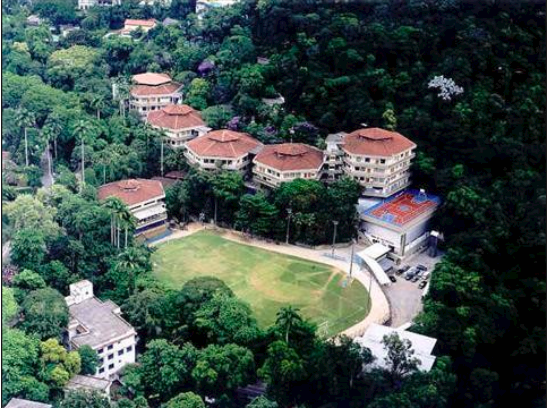
go to the office. The office is located in block 5 and it is always the
best place to get information, but if you don’t know how to get
there you can check the map and the instructions at the end of this
book.
What classes are required and which are electives?
Required classes are:
6th Grade: 7th Grade: 8th Grade:
Portuguese Portuguese Portuguese
Social Studies Social Studies Brazilian Social Studies
P.E P.E Regions and People
Math Pre Algebra P.E
Science Science Science
English English English
Drama Drama Drama
Music Art Health
Art Health Game Design
Robotics Robotics Art Studio
Will there be someone to help me on my first day?
There will be someone to help you get around on the first day of
school. He/she will help you get there to your classes. They are
called your guides they will be assigned to help you and show you
around. Also he’ll show you where the cafeteria is and where all the
shops and Snack Shack are. They will guide you for a week. If they
forget you then wait at your class or ask someone to get you there.
What is Via Sapientia?
Via Sapientia is an educational field trip, that lasts 4 days done by
middle school. Each grade goes to a different place every year, to
study about different topics. The main purpose of the trip is to
study outside of school, also known as “school without walls.” The
trip also helps students in the aspect of making new friends and
starting to know them better. It is usually done at the end of the
1st semester of school year.
How do You Get a locker?
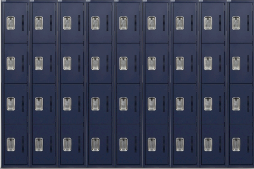
You will get your locker on orientation day before school begins.
That day your guide will tell you the available lockers and you
get to choose which one you would like. If you don’t go to
orientation the first day you you will go to the office and receive
a locker. They are not locked you will have to buy your own lock.
It can be a password lock or a key lock. You end up not using it
just to put your bag before you go to lunch. You end up carrying
your backpack to every lesson anyway.
What is Activity Period?
At EARJ there is no recess for middle school. This is because
instead of recess we have activities like soccer, basketball,
book club, scrapbook, photo club and lots more. Don’t worry
you aren’t forced to do all of them. The second Friday after
schools starts, during advisory we will go to the tartan and
there will be booths with the activity names on them. Your
advisory teacher will be put in a random order. When your
teacher is called you will pick the activities available for
Monday and Wednesday. Then you will go back to your seat.
If you were the last advisory to be called for Monday and
Wednesday activities you will be the first for the Tuesday-
Thursday activities.
When and how can I use the library?
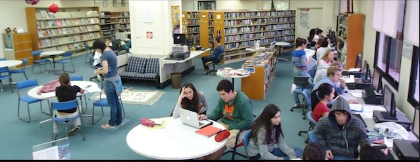
The library is open from 7:30 in the morning until 5:00 in the
afternoon. Students can go to the library before school
starts,during brunch and lunch, or after school without needing a
pass. If a student wants to go to the library during class time,
though, they need to ask their teacher for a pass.
The library is in the upper school on the second floor. When you
climb the stairs up to the second floor in the upper school, in the
seventh block, there’s a sign that will direct you to the library. It’s
on the floor right above the science wing.
There isn’t a limit to the amount of books you can check out at
the library, provided you return them all. They use the Dewey
system, of last names and call numbers. There are also
computers in the library, which can be used to print something
out or do work in class. To print something, just ask the librarian,
Ms. Barbara Andersen, and she will help you.
If you want to check out a book, there are two ways: you can go to
the desk in the front of the library, where another librarian, Ms.
Elisa Correa, will sometimes be sitting. You put the books you’re
checking out on the desk, and she’ll check them out for you. The
other way is to go to Ms. Barbara’s office, on the far left of the
library when you walk in. You can give her your books, too, and she
will check them out.
How do I use the computers at this school? Wifi? Rules?
There are computers all around the school. In the library, almost
every classroom (for teachers), and scattered around elsewhere.
You can’t use the computers without permission, unless you’re
with your class. To use the computers during times that aren’t
class time, just go to whichever place that has a computer and
ask the person who works there if you can use the computer. If
you need to use a computer to print something, just ask.
If your class took a trip to, say, the library, for a research project,
then you can choose any computer and use it. You don’t need to
ask the person working there. However, if you need to use a
computer during class time, for example to print something out,
you need to first ask the teacher of whatever class you’re in for a
pass to the library or other place with a computer. Then, if they
give you one, you have to show the person working in the
designated place the pass and say that your teacher gave you
permission to use the computer.
In order to gain access to the wifi at school, you need a username
and password. When you have one, then you can connect to the
wifi EARJ_ZONE. It will redirect you to a page that looks like the
picture to the right. Put your username and password in, then click
on ‘Login’ and it will connect you.
There’s another way to connect to the wifi. Most classrooms have
individual wifi. It’s usually something like MS511 or MS-512, with
the letters MS at the beginning and then the room number. To
connect, you have to put in a password, but the password is usually
room_[room number]. For example, for room 512 the password
would be room_512. However, the strongest one is usually
EARJ_ZONE.
Can I bring electronics and other valuables to school?
The policy at school is that you can’t use any electronic device
during school hours unless you have permission from the teacher.
However, you must have a computer or computer-like device at all
times at school. You’re also expected to have a charger. You can
bring your electronic devices to school as long as you don’t use
them during school hours.
Other valuables, such as jewelry, expensive items, or other
valuable things, are allowed at school, but they are entirely your
responsibility. That is, if you wear a really expensive brand of
jewelry to school, then you have to be responsible and not leave it
in, say, the cafeteria.
Is there time during the day to hang out and talk to my
friends?
Yes, there are a few. Of course, you can hang out with them before
and after school starts/ends. You can also hang out during brunch
and lunch. During brunch, though, you only have about fifteen
minutes to do one/some/all of the following: go to the bathroom, eat
your brunch (brought from home or bought at the snack shack) (not
mandatory), drink water, talk to friends, and get to your next class. If
your priority is friends, that’s fine, but you might not have time to do
any of the other things. Of course, you then can’t expect for the
teacher in your next class to let you go to the bathroom, because you
just had the chance to.
Lunchtime is probably the best time to talk to friends. You can walk
around the school freely, though generally people stay in the
cafeteria, snack shack area, and PE area. You can hang out for as
long as lunch is during that time, almost wherever you want.
What is Edmodo?
Edmodo is a site used by the whole school as an agenda for you to
keep track of your assignments and homework, so you don't forget
any assignment and also don't have them turned in late, also you
can do quizzes, talk to your teachers, make comments so you know
what is going on the school, it is also an easy way to turn in your
homework, you can download things, you can, etc.
What is Gmail?
Gmail is an internet program used by a lot of people in the world and
also used by EARJ to be able to communicate with you and your
parents and teachers to tell you information that you should know
but sometimes you miss school so that is one way of
communicating. Your email will be the one given by the school, and
also the same as the one for Powerschool, and Google drive but you
will have to add after your username (earj.com.br)
What is Google Drive?
Google Drive is a google program used by EARJ to keep track of
some documents that you want to keep there and you will be able to
open those documents wherever you are with internet and an
internet device. You will also need the same username and password
that the school will give you for this sites, it also keeps everything
that you have been saving there for the time you want, because you
will be using it for the whole middle school.
What is PowerSchool?
PowerSchool is an internet site used by EARJ to keep track of your
grades , so you can be able to see your grades wherever you are
with internet just by entering in google, (powerschool.earj.com.br).
You will use the same username and password that will be given by
the school just to see your progress in the different classes. It also
shows you some assignments that will be graded it in there by your
different teachers, so you can be prepared for quizzes, tests, etc.
How do I get a username and password to use EARJ’s
pages?
Go to www.earj.com.br then you’re going to find a button called
“Intranet”.
On the “intranet” site you will find a variety of different links that
will help you with your school year.
Where do I buy PE uniforms?
First you will have to go to the Upper School office and then you
pay, they will give you a note for you to go to the PE area. Ask a PE
teacher to get you two PE uniforms in your size.
What are the places I can eat?
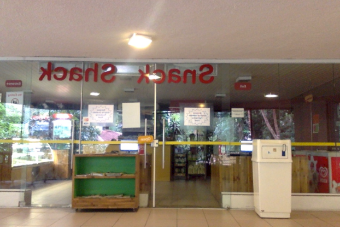
You could eat in the Snack Shack (Next to the nurses office and
the supply booth). For the Snack Shack you will need to have
money. For the cafeteria you can either use your fingerprint or
your school card, the cost to eat at the cafeteria is 12 reais. To go
to the cafeteria you will have to go down a flight of stairs which is
next to toe supply booth.
How do I find my classrooms?
Each classroom has a number. First number indicating the block, the
second number indicating the floor, and the third number indicating
the room. If the classroom number is 524, that means you would
have to go to the fifth block, second floor, and look around for the
number 524.
Each block is usually farther from the middle school office, where
most of our classes are located. The middle school office is actually in
block 5, so you can either start there and work your way by finding
the signs and following them until your get to your desired block. You
can find these signs usually by stairs and some near bathrooms.
They show in which way you need to go to get to the blocks and what
block you’re in.
Sadly, since this school was built in the middle of a humongous
jungle on top of a mountain, we have to go up a bunch of stairs
before getting to your class. But we have elevators that we can take
with a pass or if you are injured.Though it is old and is sometimes
out of order, just don’t panic if it ever stops on random floors.
What happens on the first day of school?
On the first day of school there will be someone to guide you
around the middle school area. You get your schedule from either
your teachers or a printed copy from the office directly given to you.
There might be an assembly welcoming new students and
presenting the middle school teachers, as well as after school
activities and electives. STUCO is the student council and is
explained to you and how you can sign up. STUCO is a campaign in
where students sign up to participate in helping the student body
become better. Adding activities, putting up posters, bake sales for
charities, etc.
The first day of school is the day when all your new teachers
present themselves and show you what you're going to do that
school year. They give you a syllabus in which you have to sign and
bring back to your teacher next class. The syllabus is a form,
explaining the units and policies you will have for that class. By
signing it, you show that you respect their policies and understand
the units.
What exciting events can I look forward in the middle
school this year?
Exciting events you can look forward this middle school year are
mostly holidays. The Halloween party is one of the first. Every
year, there is a Halloween party the school throws at school in
where you can go and dress up in your costume, do fun activities,
touch weird things, etc., and so much more. The most popular
activity to do in the Halloween party is going to haunted house.
No, not the lower school haunted house, the high school haunted
house. They're the scariest place to go, even if it's all fake.
Other events other than the Halloween party, there is
International Day where you're able to represent your nationality
and give your country's food out and share. There is Christmas
break, which lasts two months and so many other activities like
the STUCCO activities and the cupcake eating contests. Which is
pretty much self-explanatory... But for the most part, the events
we have here at school are exciting and full of fun!
Advisories
Every Friday you go to advisory. Advisory is where you, a few other
students, and one teacher get together. It is required that you go to
your advisory.You will do activities together and you will have a
name.The name will be chosen by the advisory group. Your advisor
is the adult in your group and you can always go to him/her for help
in any problem.
Who can I talk to if I am having problems?
There are many people you can talk to if you are having problems
but I suggest your advisor or Ms. Marcia. When you talk to them
they have to be available. Sometimes they call you in during class,
because they are too busy. Most of the time when you talk to them
they will be in their office or classroom.
What do I do if I am feeling sick?
If you are feeling sick there are always the nurses, Ms. Lilian, and
Ms. Cruzeiro. They can help you get better. She will give medicine
or let you lay down. You can go anytime except her break. Of
course you go to the nurses room which is right in front of the
lower school playground. If you want to go to the nurse’s office, you
have to ask a teacher first. Then they have to give you permission,
and a note to go to the nurse’s office. When you are really sick the
nurse will ask you to lay down or go home. If you go to the nurse
too often then a teacher might call your parents to see if you are
sick. When you go to the nurse to skip classes-or try to-the teacher
has permission to keep you from going to the nurse during that
period.
What do I do if I am absent?
f you are absent. There are a few options to get your school and
homework done. The first thing that you should do is go to
Edmodo. When you are in Edmodo the teacher might post the
homework or you can ask your classmates. There is also an option
of Powerschool or Gmail. You can also ask a teacher in advance to
give you the work. The last option is the unit plan. A lot of teacher
share the unit plan with you. Most classes have the unit plan but
not all so be careful. Your parents can call the school and let them
know that you are absent. They can also ask teachers for your
homework.
You've previewed 23 of 35 pages.
To read more:
Click Sign Up (Free)- Full access to our public library
- Save favorite books
- Interact with authors


- < BEGINNING
- END >
-
DOWNLOAD
-
LIKE(1)
-
COMMENT()
-
SHARE
-
SAVE
-
BUY THIS BOOK
(from $6.99+) -
BUY THIS BOOK
(from $6.99+) - DOWNLOAD
- LIKE (1)
- COMMENT ()
- SHARE
- SAVE
- Report
-
BUY
-
LIKE(1)
-
COMMENT()
-
SHARE
- Excessive Violence
- Harassment
- Offensive Pictures
- Spelling & Grammar Errors
- Unfinished
- Other Problem





COMMENTS
Click 'X' to report any negative comments. Thanks!