
Code Robotic and Keep up with Future eTwinning project groups' common work.
Robotik Kodla ve Geleceği Yakala eTwinning projesi ekibinin ortak ürünüdür.
https://twinspace.
etwinning.net/96285

MBLOCK İNDİRME VE KURMA
GEDİZ ATATÜRK ORTAOKULU -EBRU APAYDIN
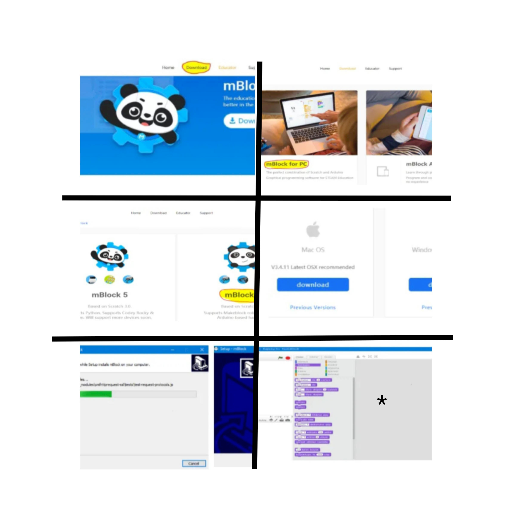
1. http://www.mblock.cc sitesine giriyoruz. İşaretli alandaki “ Download” menüsüne giriyoruz.
2.Gelen ekranda mblock için iki sürüm bulunmakta “mBlock 3” yazan versiyonu indiriyoruz.
3. Kullandığınız bilgisayarın işletim sistemine göre uygun olanı seçip indirebilirsiniz.
4. Yönergeleri takip ederek kurulum yapabilirsiniz. (Next-Next-Finish) Dil seçeneği bu aşamada ' English' seçiyoruz.
5. Kurulum başarıyla tamamlanırsa * ile işaretli resimdeki ekran gelecek.
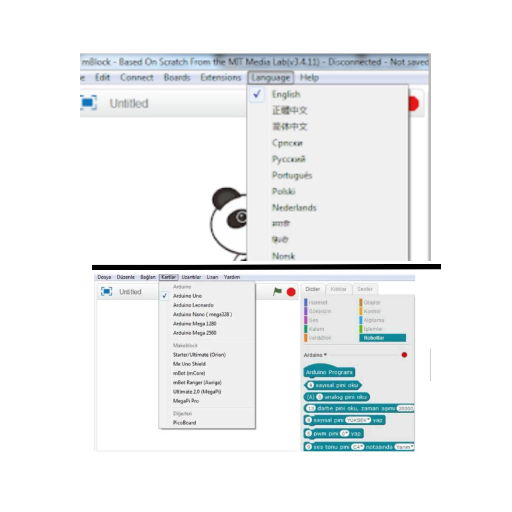
6. Eğer Türkçe çalışmak isterseniz arayüzde üst menüdeki language' den Türkçe yi seçiyoruz.
7.Son olarak üst menüdeki kartlar' dan çalışacağımız kartı seçiyoruz (uno/leonardo/nano/mega/vb).Robotlar sekmesinde kod bloklarımız hazır.
1. We enter 'http://www.mblock.cc' and click 'download'.
2. There are two versions and we choose 'mBlock 3'.
3. Next click the appropriate operating system.
4. Follow the set up instructions. (Next-Next-Finish) Choose English language option on this phase.
5.If the set up is successful, you will see the * marked screen.
6. If you want to work in Turkish, choose Turkish from the upper menu 'language' segment.
7.Lately, we choose the appropriate card(uno/leonardo/nano/mega/etc) from cards segment at upper menu. Our code blocks are ready to use at 'robots' segment.
DOWNLOADING AND SETTING UP MBLOCK
GEDİZ ATATÜRK SS -EBRU APAYDIN
GEDİZ ATATÜRK SS -EBRU APAYDIN
GEDİZ ATATÜRK SS -EBRU APAYDIN
BUZZER KULLANIMI VE MELODİ OLUŞTURMA
Arzu DÜZENLİ - MURAT ATILGAN ORTAOKULU
Buzzer, arduino da ses çalmasını istediğimiz durumlarda kullanılan bir araçtır. Park sensörü, yangın sensörü gibi sesli uyarı vermek istediğimiz projelerde buzzer kullanabiliriz.BİP sesi çıkaran bir nevi hoparlördür.
Buzzer is a tool used when we want to play a sound in arduino. We can use buzzer in project where we want to give a sound warning such as parking sensor, fire sensor.
USING BUZZER AND CREATING MELODY WITH BUZZER
Arzu DÜZENLİ - MURAT ATILGAN ORTAOKULU
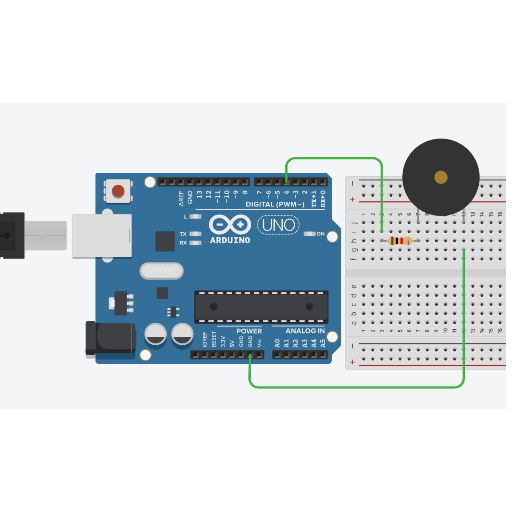
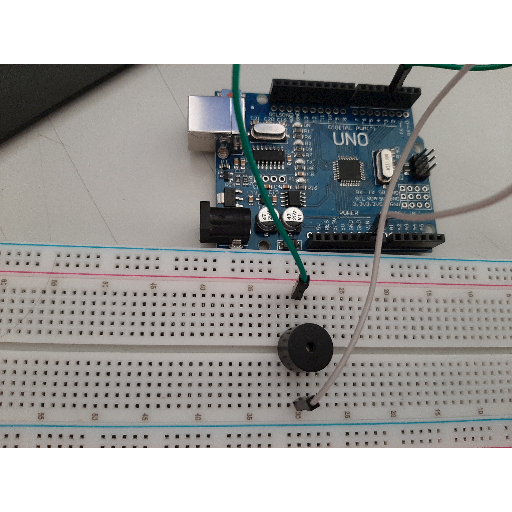
Devre şemasında görüldüğü üzere eksi(-) bacak Arduino daki GND bacağına, artı(+) bacak da direnç bağlanarak dijital pinlere bağlanmaktadır. Biz bu projede 4 nolu pine bağladık.
BUZZER KULLANIMI VE MELODİ OLUŞTURMA
Arzu DÜZENLİ - MURAT ATILGAN ORTAOKULU
As seen in the circuit diagram the negative leg is connected to gnd leg in Arduino and the positive leg is connected to the digital pins by connected the resistor.ın this project we used pin 4.
USING BUZZER AND CREATING MELODY WITH BUZZER
Arzu DÜZENLİ - MURAT ATILGAN ORTAOKULU
BUZZER KULLANIMI VE MELODİ OLUŞTURMA
Arzu DÜZENLİ - MURAT ATILGAN ORTAOKULU
BUZZER KULLANIMI VE MELODİ OLUŞTURMA
Arzu DÜZENLİ - MURAT ATILGAN ORTAOKULU
CONNECTING BLUETOOTH HC05 MODULE
GEDİZ ATATÜRK SS -EBRU APAYDIN

BLUETOOTH HC 05 BAĞLAMA
GEDİZ ATATÜRK ORTAOKULU -EBRU APAYDIN
Bluetooth bağlantısı
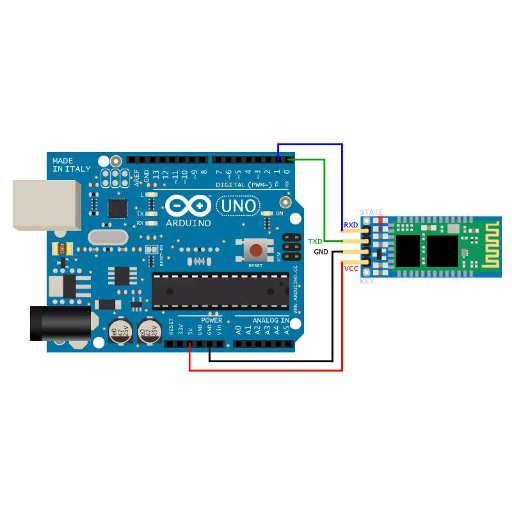
Bluetooth hc 05 bağlantısı 4pin ile yapılır. Ortadaki 4pin kullanılır. Bluetooth daki gnd pini arduinodaki gndye, bluetoothdaki vcc pini arduinodaki 5v a, bluetoothdaki txd yi arduinodaki 0(rxd)'a, bluetoothdaki rxd yi arduinodaki 1(txd)' e bağlanır. Telefona ya da tablete Appstore ya da Playstore'dan 'Bluetooth RC Controller' uygulamasını indirilir. Ayarlar menüsünden eşleşecek cihazı seçip şifreyi 0000 ya da 1234 olarak girilir. Bluetooth bağlantısı hazır. Cihazı kontrol etmeye başlayabilirsiniz.
CONNECTING BLUETOOTH HC05 MODULE
GEDİZ ATATÜRK SS -EBRU APAYDIN
Bluetooth connection
Bluetooth hc 05 connection is done with 4pins. Use 4pins in the middle. Connect gnd pin on Bluetooth module to gnd pin on arduino. Then connect vcc pin on Bluetooth module to 5v pin on arduiono. Next connect txd on Bluetooth module to 0(rxd) on arduino. Finally, connect rxd on Bluetooth module to 1(txd).
Download ' Bluetooth RC Controller' application from Appstore or Playstore to your phone or tablet. Choose the device that will match from settings and set the password as 0000 or 1234. Bluetooth connection is ready. You can start to control the device.
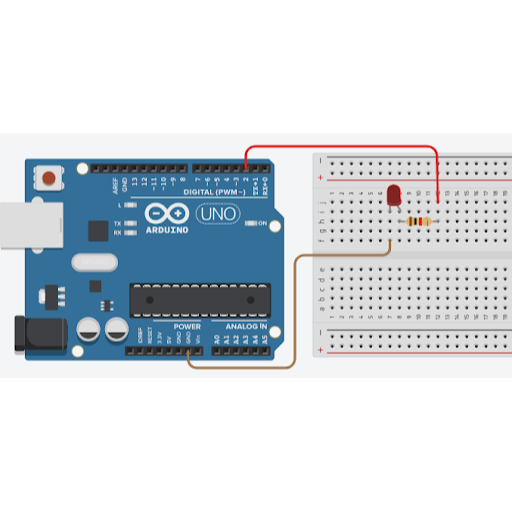
Led arduino ve bir çok robotik projenin en çok kullanılan devre elemanlarından bir tanesidir. Ledlerin iki bacağından uzun olan + (pozitif) uçtur ve arduino dijital pinlerinden birine bağlanmalıdır. Kısa olan bacak ise – (negatif) uçtur ve arduino kartına GND pininden bağlanmalıdır.
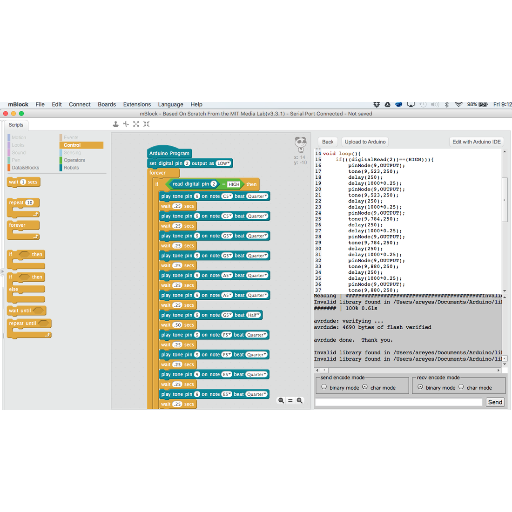
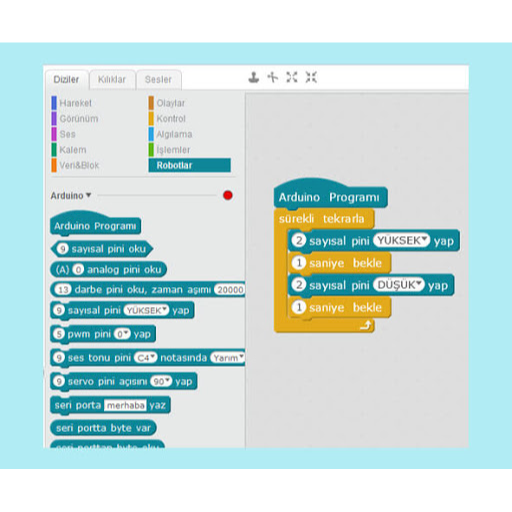
mBlock ile arduino kartı ve port seçimi nasıl yazılır?
Mblock ile arduino kodlamaya başlamadan önce hangi arduino kartını kullandığımızı mBlock programında belirtmemiz gerekiyor. Bu işlem için üst menülerden ‘Kartlar’ başlığını tıklayarak kullanacağımız arduino kartını işaretlememiz gerekiyor.
Aynur KORKMAZ
Şalpazarı Anadolu İmam Hatip Lisesi
Led Blinking
Led is one of the most used circuit elements of arduino and many robotic projects. It is the + (positive) end that is longer than the two legs of the leds and should be connected to one of the Arduino digital pins. The short leg is the - (negative) end and must be connected to the arduino board from the GND pin.
How to write arduino board and port selection with mBlock?
Before we start arduino encoding with mblock, we need to specify which arduino board we use in mBlock program. For this process, we need to mark the arduino board that we will use by clicking on the 'Cards' title from the top menus.
Led Blinking
Arduino
mBlock Codes
Servo Motor Nedir?
Kızılçukur Şehit Ahmet Şılak Ort.- Erol GÜNEYCE
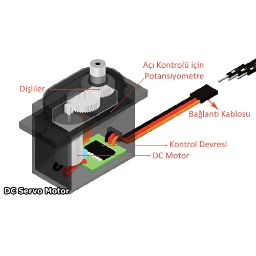
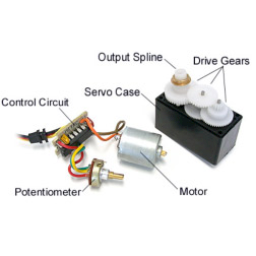
Servo motor mekaniksel konum, hız veya ivme gibi parametrelerin kontrol edildiği, kısaca hareket kontrolü yapılan bir sistemlerdir. Servo motor içerisinde herhangi bir DC motor, AC motor yada Step motor bulunabilir. Motorun yanında motorun hareketi için sürücü ve hareketlerinin kontrolü içinde kontrol devresini içerisinde barındırmaktadır.
What is Servo Motor?
Kızılçukur Şehit Ahmet Şılak SS.- Erol GÜNEYCE
Servo motor is a system in which parameters such as mechanical position, speed or acceleration are controlled and motion control is briefly performed. The servo motor can contain any DC motor, AC motor or Stepper motor. It contains the control circuit in the control of the driver and movements for the movement of the engine next to the engine.
Servo Motor Nedir?
Kızılçukur Şehit Ahmet Şılak Ort.- Erol GÜNEYCE
Genellikle çalışma açıları 180 derece ile sınırlıdır fakat 360 derece çalışma açısına sahip özel amaçlı servo motorlar da vardır. Servolar genellikle 4.8-6V gerilim ile çalışmaktadırlar. 7.4V ve daha yüksek gerilimle çalışan servolar da bulunmaktadır.
What is Servo Motor?
Kızılçukur Şehit Ahmet Şılak SS.- Erol GÜNEYCE
Generally, the working angles are limited to 180 degrees, but there are also special purpose servo motors with 360 degree working angles. Servos generally operate with 4.8-6V voltage. There are also servos that operate with voltage of 7.4V and higher.
Servo Motor Nedir?
Kızılçukur Şehit Ahmet Şılak Ort.- Erol GÜNEYCE
Servo motor arduino bağlantısı nasıl yapılır?
Kızılçukur Şehit Ahmet Şılak Ort.- Erol GÜNEYCE
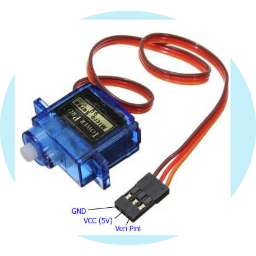
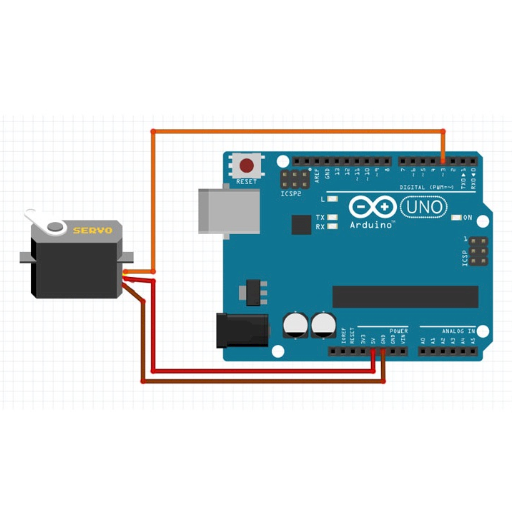
Servo motorların 3 farklı renkte kablosu bulunmaktadır. Bunlardan kahverengi olan arduino GND pinine, kırmızı olan arduino 5V pinine ve turuncu olanı ise arduino pwm pinlerinden birine bağlanmalıdır. Pwm pinleri arduino dijital pinlerinden yanında ~ işareti olan 3,5,6,9,10,11 numaralı pinlerdir.
How to connect servo motor arduino?
Kızılçukur Şehit Ahmet Şılak SS. - Erol GÜNEYCE
Servo motors have 3 different colored cables. The brown one should be connected to the GNU pin, the red one to the 5V pin, and the orange one to the arduino pwm pins. Pwm pins are 3,5,6,9,10,11 numbered pins with ~ beside the Arduino digital pins.
Servo motor arduino bağlantısı nasıl yapılır?
Kızılçukur Şehit Ahmet Şılak Ort. - Erol GÜNEYCE
Servo motor arduino bağlantısı nasıl yapılır?
Kızılçukur Şehit Ahmet Şılak Ort. - Erol GÜNEYCE
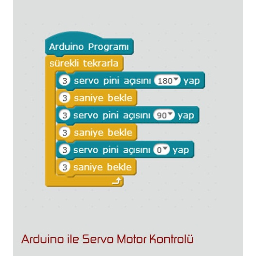
How to connect servo motor arduino?
Kızılçukur Şehit Ahmet Şılak SS. - Erol GÜNEYCE
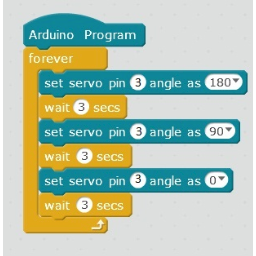
Diğer bir kodlama yöntemimiz ile mBlock servo motor kodları nasıl yazılır?
Kızılçukur Şehit Ahmet Şılak Ort. - Erol GÜNEYCE
Kodları yazmaya başlamadan önce ‘Veri&Blok’ başlığı altındaki ‘Bir Değişken Oluştur’ butonuna basarak pwm adında bir değişken oluşturuyoruz.
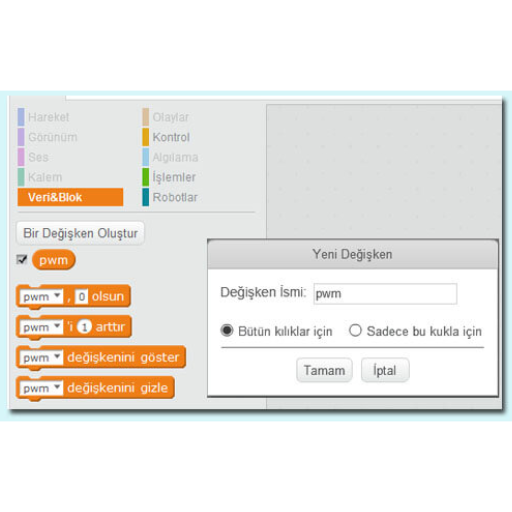
How to write mBlock servo motor codes with another coding method?
Kızılçukur Şehit Ahmet Şılak SS. - Erol GÜNEYCE
Before we start writing the codes, we create a variable named pwm by pressing the 'Make a Variable' button under the 'Data & Blocks' heading.
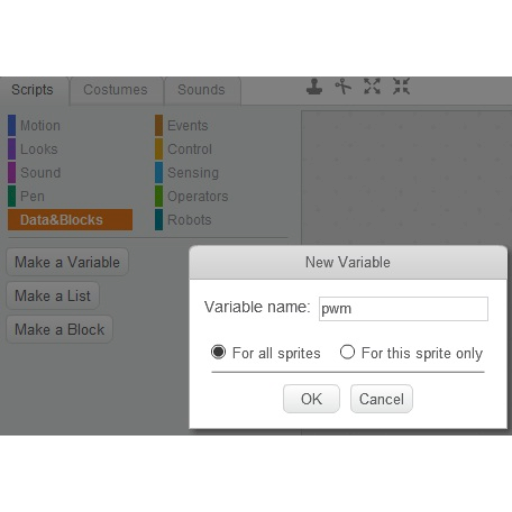
Diğer bir kodlama yöntemimiz ile mBlock servo motor kodları nasıl yazılır?
Kızılçukur Şehit Ahmet Şılak Ort. - Erol GÜNEYCE
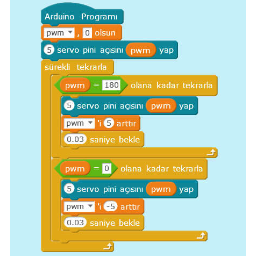
Sonrasında yandaki mblock kod yapısını hazırlıyoruz.
How to write mBlock servo motor codes with another coding method?
Kızılçukur Şehit Ahmet Şılak SS. - Erol GÜNEYCE
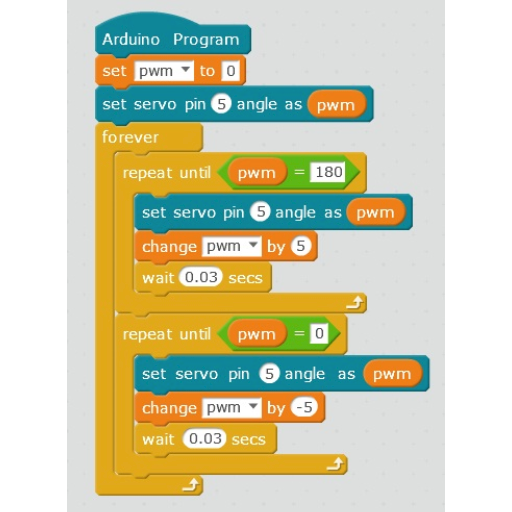
Then we prepare the mblock code structure on the side.
Diğer bir kodlama yöntemimiz ile mBlock servo motor kodları nasıl yazılır?
Kızılçukur Şehit Ahmet Şılak Ort. - Erol GÜNEYCE
Kodları açıklayacak olursak; öncelikle pwm değişkenin değerini 0 yapıp servo motorun bağlı olduğu 5 numaralı arduino pwm pine bu değişken değerini göndererek servo motoru 0 pozisyonuna ayarlıyoruz. Sonrasında sürekli tekrarla bloğu içinde önce pwm değişkeni 180 olana kadar 5’er arttırarak servo motor pinine gönderiyoruz. Burada pwm değişken değeri 180 eşit olacağı için servo motoru geri yönde döndürmek için pwm 0 olana kadar değişken değerini 5’er azaltarak işlem yapıyoruz. İşlemlerin arasında 0,03 sn gibi bir bekleme süresi koyarak motoru biraz yavaşlatıyoruz.
How to write mBlock servo motor codes with another coding method?
Kızılçukur Şehit Ahmet Şılak SS. - Erol GÜNEYCE
If we explain the codes; Firstly, we set the value of the pwm variable to 0 and send this variable value to the number 5 arduino pwm pin to which the servo motor is connected, and set the servo motor to the 0 position. Then, in the repeat block, we first increase the pwm variable to 180 and send it to the servo motor pin by increasing it by 5. Since pwm variable value will be equal to 180, in order to rotate the servo motor in the reverse direction, we process the variable by decreasing the variable value by 5 until pwm is 0. We slow down the motor a little by putting a waiting time of 0.03 sec between the processes.
DÜZCE BORSA İSTANBUL
MESLEKİ VE TEKNİK ANADOLU LİSESİ
MELEK DİCLE
BLUETOOTH(HC-05) İLE 7 LED'Lİ DEVRE
7 LED CIRCUIT WITH BLUETOOTH (HC-05)
DÜZCE BORSA İSTANBUL MTAL-MELEK DİCLE
BLUETOOTH(HC-05) İLE 7 LED'Lİ DEVRE
Sıralı şekilde konumlandırılmış 7 adet LED’i, Bluetooth yardımı ile 100 msn. aralıklarla flaşör şeklinde kontrol etmek
Projenin Amacı;
DÜZCE BORSA İSTANBUL MTAL-MELEK DİCLE
7 LED CIRCUIT WITH BLUETOOTH (HC-05)
7 LEDs positioned sequentially, 100 msec with the help of Bluetooth intermittent flasher control
The Purpuse of the Project;
DÜZCE BORSA İSTANBUL MTAL-MELEK DİCLE
BLUETOOTH(HC-05) İLE 7 LED'Lİ DEVRE
Devremize güç kaynağı bağlanır. Bluetooth yardımı ile LED’lerin yanma hızı ve biçimi kontrol edilir. Bu kontrol kodladığımız Arduino ile gerçekleşir. Bunun için öncelikle Arduino kodumuz yazılmalıdır.
Projenin Çalışma Prensibi;
Power supply is connected to our circuit. With the help of Bluetooth, the burning speed and shape of the LEDs are controlled. This control takes place with the Arduino that we have encoded. For this, our Arduino code must be written first.
DÜZCE BORSA İSTANBUL MTAL-MELEK DİCLE
7 LED CIRCUIT WITH BLUETOOTH (HC-05)
Working Principle of the Project;
Projede Kullanılan mBlock Kodları
DÜZCE BORSA İSTANBUL MTAL-MELEK DİCLE
BLUETOOTH(HC-05) İLE 7 LED'Lİ DEVRE
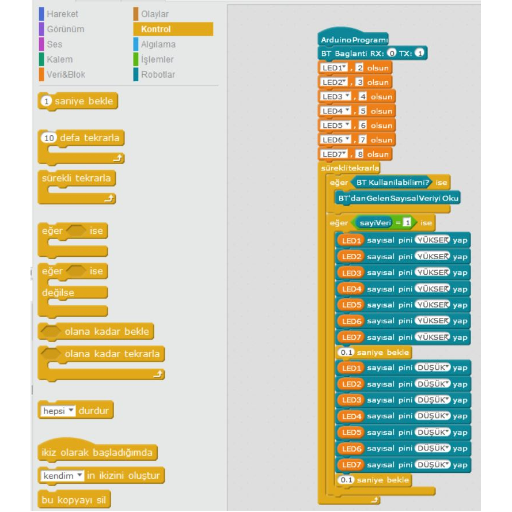
mBlock Codes Used in the Project
DÜZCE BORSA İSTANBUL MTAL-MELEK DİCLE
7 LED CIRCUIT WITH BLUETOOTH (HC-05)
DÜZCE BORSA İSTANBUL MTAL-MELEK DİCLE
BLUETOOTH(HC-05) İLE 7 LED'Lİ DEVRE
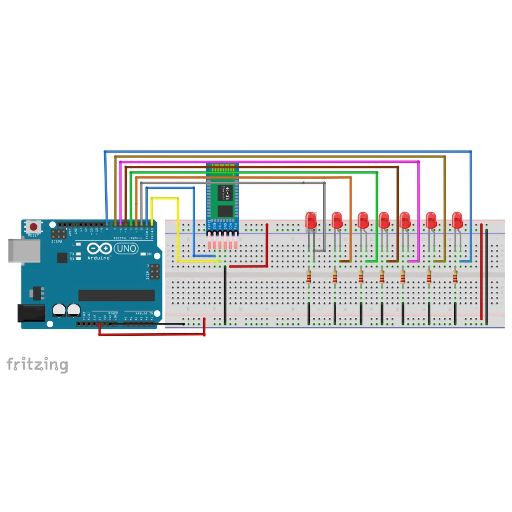
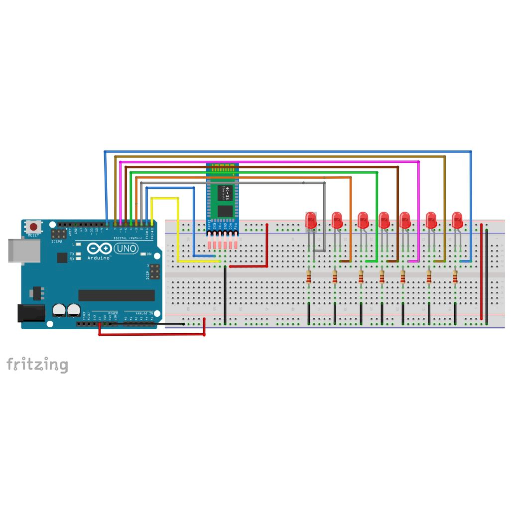
mBlock'ta yazılıp Arduino kartına yüklenen programın ardından devre kurulumuna geçilir. Devre kurulumu ise çok basittir. Bu projede Fritzing’de devrenin simülasyonu yapılmıştır.
After the program written in the mBlock and loaded on the Arduino board, the circuit setup is started. Circuit setup is very simple. In this project, the circuit is simulated in Fritzing.
DÜZCE BORSA İSTANBUL MTAL-MELEK DİCLE
7 LED CIRCUIT WITH BLUETOOTH (HC-05)
Devrenin Fritzing’de Şeması
DÜZCE BORSA İSTANBUL MTAL-MELEK DİCLE
BLUETOOTH(HC-05) İLE 7 LED'Lİ DEVRE
Scheme of the circuit in Fritzing
DÜZCE BORSA İSTANBUL MTAL-MELEK DİCLE
7 LED CIRCUIT WITH BLUETOOTH (HC-05)
DÜZCE BORSA İSTANBUL MTAL-MELEK DİCLE
BLUETOOTH(HC-05) İLE 7 LED'Lİ DEVRE
Kullanılan Malzemeler;
-7 adet kırmızı LED
-Arduino Uno
-9V Güç Kaynağı (Pil)
-7 adet 220 ohm direnç
-Jumper Kablo
-HC-05 Bluetooth Modülü
DÜZCE BORSA İSTANBUL MTAL-MELEK DİCLE
7 LED CIRCUIT WITH BLUETOOTH (HC-05)
Used Materials;
- 7 red LEDs
-Arduino Uno
-9V Power Supply (Battery)
-220 ohm resistors
-Jumper Cable
-HC-05 Bluetooth Module
DÜZCE BORSA İSTANBUL MTAL-MELEK DİCLE
BLUETOOTH(HC-05) İLE 7 LED'Lİ DEVRE
Devre kurulup, Arduino Kartına verilen kod yüklendikten sonra, Bluetooth ile kontrolü sağlamak için Arduino Kontrol Programını Android telefonumuza yüklemek gerekir. Play Store’da birçok yazılıp paylaşılmış program mevcuttur. Herhangi birisini kullanabilirsiniz.
After the circuit is installed and the code given to the Arduino Board is loaded, it is necessary to install the Arduino Control Program on our Android phone in order to control it via Bluetooth. There are many written and shared programs in the Play Store. You can use any.
DÜZCE BORSA İSTANBUL MTAL-MELEK DİCLE
7 LED CIRCUIT WITH BLUETOOTH (HC-05)
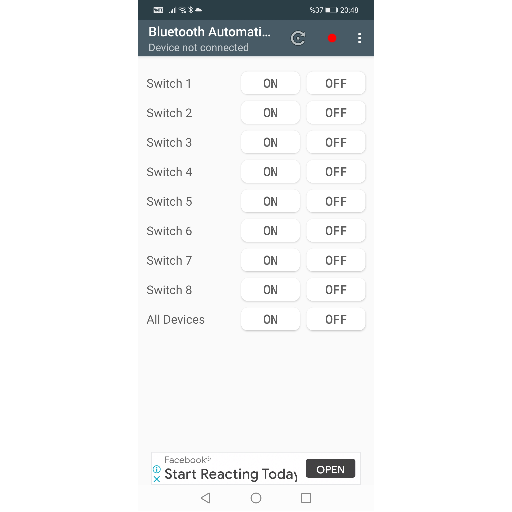
Bu projede, arayüzü ile kullanımı ve anlaşılırlığı kolay bir program olan “Bluetooth Automation Controller” adlı programı kullandık.
Öncelikle telefonun Bluetooth özelliğinin açılması gerekir. Ardından uygulama açılıp bluetooth üzerinden HC-05 bluetooth modülü eşleştirilmelidir. Eşleşme işlemini yaptıktan sonra ledleri kontrol aşamasına geçmekteyiz.
DÜZCE BORSA İSTANBUL MTAL-MELEK DİCLE
BLUETOOTH(HC-05) İLE 7 LED'Lİ DEVRE
In this project, we used the program called "Bluetooth Automation Controller" which is an easy to use and understandable interface.
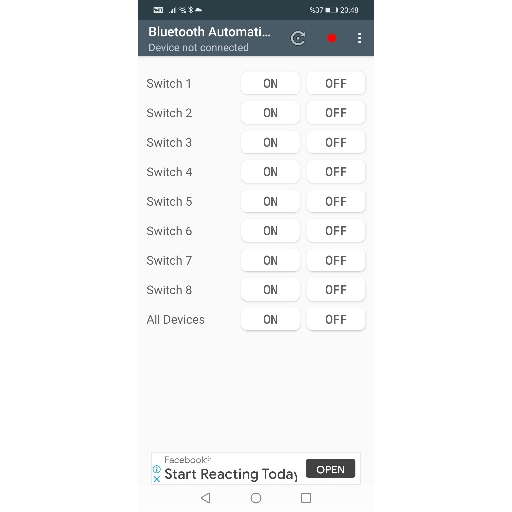
First of all, the Bluetooth feature of the phone must be turned on. Then the application should be opened and the HC-05 bluetooth module should be paired via bluetooth. After doing the matching process, we proceed to the control stage of the leds.
DÜZCE BORSA İSTANBUL MTAL-MELEK DİCLE
7 LED CIRCUIT WITH BLUETOOTH (HC-05)
DÜZCE BORSA İSTANBUL MTAL-MELEK DİCLE
BLUETOOTH(HC-05) İLE 7 LED'Lİ DEVRE
(7 LED CIRCUIT WITH BLUETOOTH (HC-05))

Proje Tanıtım Videosu
Proje mBlock Kodları

(Project Introduction Video)
(Project mBlock Codes)
- Full access to our public library
- Save favorite books
- Interact with authors
- < BEGINNING
- END >
-
DOWNLOAD
-
LIKE(6)
-
COMMENT()
-
SHARE
-
SAVE
-
BUY THIS BOOK
(from $15.79+) -
BUY THIS BOOK
(from $15.79+) - DOWNLOAD
- LIKE (6)
- COMMENT ()
- SHARE
- SAVE
- Report
-
BUY
-
LIKE(6)
-
COMMENT()
-
SHARE
- Excessive Violence
- Harassment
- Offensive Pictures
- Spelling & Grammar Errors
- Unfinished
- Other Problem





COMMENTS
Click 'X' to report any negative comments. Thanks!